MkDocs Setup
README.md#
I keep my Github repo private and deploy via Cloudflare Pages & Cloudflare Worker CI.
This article will basically get you up to speed for how I build my site.
README.md
MkDocs 1080p Fix Theme#
This project uses my custom mkdocs-material theme fork.
It changes a few lines to fix the rendering of pages around ~50% of a 1080p display.
Download#
First, we need to clone both this repo and my custom theme.
git clone --recursive <REPO>
Or for SSH (if HTTPS isn't working):
[email protected]:<USERNAME>/<REPO>.git
If you just cloned the main repo, navigate to the theme directory and init the submodule:
WARN: This may delete uncommitted changes, commit and push what you have first.
cd theme/mkdocs-material-1080p-fix/
git submodule update --init --recursive
Build & Serve#
Built on Python 3.14
- optimize plugin uses pngquant, which is a PATH item. CI doesn't like it. CI can use pngquant-cli but untrusted.
NOTE: I have - optimize disabled, preferring to manually do it until a better option presents itself.
- privacy plugin requires symlinking, which requires Windows developer mode enabled or symlink policy enabled.
NOTE: You could also remove the - privacy plugin, or enabling on deploy.
As admin:
Set-ExecutionPolicy Bypass
Install requirements (dev):
python -m venv venv
./venv/Scripts/activate # Linux: . venv/bin/activate
pip install -r requirements.txt
Serve:
mkdocs serve --livereload
CI#
Deployed via Cloudflare worker upon push to Github.
Default mkdocs profile (mkdocs build and deploying /site) using Python 3.13 (Seems not to matter).
https://developers.cloudflare.com/pages/configuration/build-image/#languages-and-runtime
Mkdocs.yaml#
Here is my mkdocs.yaml, the main configuration section for the site.
I leave things commented out that I may use in the future.
My Warning
site_name: "ComfyTechTips"
site_url: https://comfytechtips.org
site_description: "ComfyTechTips - Making Technology Comfortable"
site_author: "ComfyTechTips"
copyright: "<a href='https://creativecommons.org/licenses/by/4.0/'>CC BY 4.0</a><br>Copyright © 2025 ComfyTechTips"
theme:
name: material
language: en
logo: assets/ctt-invis.png
favicon: assets/favicon/favicon.ico
icon:
repo: octicons/code-24
edit: material/pencil-box
view: material/code-not-equal-variant
font:
text: Source Sans Pro
code: Google Sans Code
features:
- announce.dismiss
- content.code.copy
- content.tabs.link
- content.code.annotate
# - header.autohide
- navigation.expand
- navigation.footer
- navigation.instant
- navigation.instant.progress
- navigation.instant.prefetch
- navigation.path
- navigation.tabs
- navigation.tabs.sticky
# - navigation.top
- navigation.sections
- tabs
- toc.integrate
- toc.follow
palette:
# Palette toggle for light mode
- media: "(prefers-color-scheme: light)"
scheme: default
primary: teal
accent: green
toggle:
icon: material/weather-night
name: Switch to Dark Mode
# Palette toggle for dark mode
- media: "(prefers-color-scheme: dark)"
scheme: slate
primary: black
accent: teal
toggle:
icon: material/weather-sunny
name: Switch to Light Mode
markdown_extensions:
- admonition
- attr_list
- codehilite:
guess_lang: false
linenums: false
- def_list
- footnotes
- md_in_html
- meta
- pymdownx.arithmatex
- pymdownx.betterem:
smart_enable: all
- pymdownx.caret
- pymdownx.critic
- pymdownx.details
- pymdownx.emoji:
emoji_index: !!python/name:material.extensions.emoji.twemoji
emoji_generator: !!python/name:material.extensions.emoji.to_svg
- pymdownx.inlinehilite
- pymdownx.magiclink
- pymdownx.mark
- pymdownx.smartsymbols
- pymdownx.superfences
- pymdownx.tabbed:
alternate_style: true
- pymdownx.tasklist
- pymdownx.tilde
- sane_lists
- toc:
toc_depth: "3"
permalink: '#'
slugify: !!python/object/apply:pymdownx.slugs.slugify
kwds:
case: lower
plugins:
- awesome-nav:
filename: .nav.yml
logs:
nav_override: warning
root_title: warning
root_hide: warning
no_matches: warning
- blog:
blog_dir: .
blog_toc: true
post_dir: blog
post_url_format: "blog/{slug}"
# archive: false
archive_name: "Blog"
archive_toc: true
categories: false
- exclude:
glob:
- "*.tmp"
- "*.gz"
regex:
- '.*\.(tmp|bin|tar)$'
- git-revision-date-localized:
timezone: America/Chicago
exclude:
- index.md
# If git logs can't be read (for generated/out-of-repo files), fall back to the build date
fallback_to_build_date: true
- glightbox
- minify:
minify_html: true
htmlmin_opts:
remove_comments: true
cache_safe: true
minify_css: true
css_files:
- stylesheets/extra.css
minify_js: true
# - privacy # Breaks glightbox on first load as of 2025-11
# - optimize # requires pngquant PATH, CI doesn't like. OR pngquant-cli, but untrusted. OR pre-optimize before deploy manually.
- redirects:
# redirect_maps:
# 'old.md': 'databases/concepts/Databases.md'
# - rss:
# match_path: "blog.*" # Ensure site_url is set, else won't work in prod
# pretty_print: true
# use_git: false
# date_from_meta:
# as_creation: date.created
- search
- autolinks
# - unused_files: Test
# dir: attachment
# excluded_files: .*-github-1.png
extra_css:
- stylesheets/extra.css
extra_javascript:
- javascripts/extra.js
extra:
generator: false
social:
# - icon: fontawesome/solid/envelope
# link: mailto:[email protected]
- icon: fontawesome/brands/github
link: https://github.com/comfytechtips
# - icon: simple/rss
# link: /feed_rss_created.xml
Extra.js#
Here is my custom javascript for the site, just the arrow on the homepage:
Extra.js
// All this is my vibecoded arrow to direct first time visitors, don't judge!

// Make site title clickable and return to home
document.addEventListener('DOMContentLoaded', function() {
  const siteTitle = document.querySelector('.md-header__title');
  if (siteTitle) {
    siteTitle.addEventListener('click', function() {
      window.location.href = '/';
    });
  }
});

// Dynamic arrow from #recommend-text to search box (only on index/home page, first visit only)
function drawDynamicArrow() {
  // Check if arrow has been dismissed
  if (sessionStorage.getItem('arrowDismissed') === 'true') {
    return;
  }

  // Only draw arrow on the home/index page
  const recommendText = document.getElementById('recommend-text');
  const searchBox = document.querySelector('.md-search');

  // Remove existing arrow if present
  const existingArrow = document.getElementById('dynamic-arrow-svg');

  // If not on index page or elements don't exist, remove arrow and exit
  if (!recommendText || !searchBox) {
    if (existingArrow) existingArrow.remove();
    return;
  }

  if (existingArrow) existingArrow.remove();

  // Get positions
  const textRect = recommendText.getBoundingClientRect();

  // Check if recommend text is covered by header
  const mdHeader = document.querySelector('.md-header');
  if (mdHeader) {
    const headerRect = mdHeader.getBoundingClientRect();
    // If header is visible and the text's top is above header bottom
    if (headerRect.bottom > 0 && textRect.top < headerRect.bottom) {
      // Text is covered/overlapped by header, hide arrow
      if (existingArrow) existingArrow.remove();
      return;
    }
  }

  // Check if recommend text is covered by tabs
  const mdTabs = document.querySelector('.md-tabs');
  if (mdTabs) {
    const tabsRect = mdTabs.getBoundingClientRect();
    // If tabs are below the top of the page and the text's top-right corner is below tabs bottom
    if (tabsRect.bottom > 0 && textRect.top < tabsRect.bottom && textRect.right > tabsRect.left) {
      // Text is covered/overlapped by tabs, hide arrow
      if (existingArrow) existingArrow.remove();
      return;
    }
  }

  // Check both search overlay and search box
  const searchOverlay = document.querySelector('.md-search__overlay');
  const searchBoxRect = searchBox.getBoundingClientRect();
  const overlayRect = searchOverlay ? searchOverlay.getBoundingClientRect() : null;

  let targetElement;
  let searchRect;

  // Determine which element is visible and usable
  if (overlayRect && overlayRect.width > 0 && overlayRect.height > 0 &&
      overlayRect.left >= 0 && overlayRect.right <= window.innerWidth) {
    // Overlay is visible and in viewport - use it
    targetElement = searchOverlay;
    searchRect = overlayRect;
  } else if (searchBoxRect.width > 0 && searchBoxRect.height > 0 &&
             searchBoxRect.left >= 0 && searchBoxRect.right <= window.innerWidth) {
    // Search box is visible and in viewport - use it
    targetElement = searchBox;
    searchRect = searchBoxRect;
  } else {
    // Default to whichever element exists
    targetElement = searchBox;
    searchRect = searchBoxRect;
  }

  // Calculate start and end points
  // Start at top-right of recommend text
  const startX = textRect.right;
  const startY = textRect.top;
  // End at bottom-left of search element (overlay on small screens, box on larger screens)
  const endX = searchRect.left;
  const endY = searchRect.bottom;

  // Calculate control points for curved path
  const midX = startX + (endX - startX) * 0.5;
  const midY = startY - Math.abs(endY - startY) * 0.5;

  // Create SVG with defs for marker
  const svg = document.createElementNS('http://www.w3.org/2000/svg', 'svg');
  svg.id = 'dynamic-arrow-svg';
  svg.setAttribute('width', '100%');
  svg.setAttribute('height', '100%');

  // Create defs for arrowhead marker
  const defs = document.createElementNS('http://www.w3.org/2000/svg', 'defs');
  const marker = document.createElementNS('http://www.w3.org/2000/svg', 'marker');
  marker.setAttribute('id', 'arrowhead-dynamic');
  marker.setAttribute('markerWidth', '10');
  marker.setAttribute('markerHeight', '10');
  marker.setAttribute('refX', '9');
  marker.setAttribute('refY', '3');
  marker.setAttribute('orient', 'auto');
  marker.setAttribute('markerUnits', 'strokeWidth');

  const arrowShape = document.createElementNS('http://www.w3.org/2000/svg', 'polygon');
  arrowShape.setAttribute('points', '0 0, 10 3, 0 6');
  arrowShape.setAttribute('fill', '#ff6600');

  marker.appendChild(arrowShape);
  defs.appendChild(marker);
  svg.appendChild(defs);

  // Create curved path with marker
  const path = document.createElementNS('http://www.w3.org/2000/svg', 'path');
  const pathData = `M ${startX} ${startY} Q ${midX} ${midY}, ${endX} ${endY}`;
  path.setAttribute('d', pathData);
  path.setAttribute('marker-end', 'url(#arrowhead-dynamic)');

  svg.appendChild(path);
  document.body.appendChild(svg);
}

// Remove arrow and mark as dismissed
function removeArrow() {
  const existingArrow = document.getElementById('dynamic-arrow-svg');
  if (existingArrow) {
    existingArrow.remove();
  }
  sessionStorage.setItem('arrowDismissed', 'true');
}

// Handle SPA navigation - check for arrow on all navigation events
function handleNavigation() {
  setTimeout(drawDynamicArrow, 100);
}

// Initial draw
document.addEventListener('DOMContentLoaded', handleNavigation);

// Listen for SPA navigation events
document.addEventListener('DOMContentLoaded', function() {
  // MkDocs Material uses instant navigation
  // Listen for navigation events
  document$.subscribe(handleNavigation);

  // Watch for search box interaction
  const searchInput = document.querySelector('.md-search__input');
  const searchToggle = document.querySelector('[data-md-toggle="search"]');

  if (searchInput) {
    searchInput.addEventListener('focus', removeArrow);
    searchInput.addEventListener('input', removeArrow);
  }

  if (searchToggle) {
    searchToggle.addEventListener('change', function() {
      if (this.checked) {
        removeArrow();
      }
    });
  }

  // Also watch for clicks on search button/icon
  const searchButton = document.querySelector('.md-search__icon[for="__search"]');
  if (searchButton) {
    searchButton.addEventListener('click', removeArrow);
  }
});

// Also handle resize and scroll (but only if not dismissed)
// Track viewport width to detect actual width changes
let lastWidth = window.innerWidth;

function checkAndRedraw() {
  const currentWidth = window.innerWidth;
  if (currentWidth !== lastWidth) {
    lastWidth = currentWidth;
    drawDynamicArrow();
  }
}

// Multiple methods to catch resize events
window.addEventListener('resize', function() {
  checkAndRedraw();
});

// Use matchMedia to detect responsive breakpoint changes
const mobileQuery = window.matchMedia('(max-width: 58.109375em)');
const tabletQuery = window.matchMedia('(min-width: 58.125em)');

mobileQuery.addEventListener('change', function() {
  setTimeout(drawDynamicArrow, 100);
});

tabletQuery.addEventListener('change', function() {
  setTimeout(drawDynamicArrow, 100);
});

window.addEventListener('scroll', drawDynamicArrow);

// Watch for page width changes more granularly
if (window.ResizeObserver) {
  const resizeObserver = new ResizeObserver(function(entries) {
    for (let entry of entries) {
      if (entry.contentBoxSize) {
        checkAndRedraw();
      }
    }
  });
  resizeObserver.observe(document.documentElement);
}

// Also check periodically when on index page (lightweight fallback)
let checkInterval;
function startPeriodicCheck() {
  if (document.getElementById('recommend-text')) {
    checkInterval = setInterval(checkAndRedraw, 500);
  } else {
    clearInterval(checkInterval);
  }
}

document.addEventListener('DOMContentLoaded', startPeriodicCheck);
document$.subscribe(startPeriodicCheck);
Extra.css#
Here is my custom CSS for the site:
extra.css
/* Ignore the awful CSS, lots of plug and chug */
.md-grid, .md-content__inner {
max-width: 960px;
/* 101 char plaintext */
/* max-width: 1220px; */
/* 140 char plaintext */
/* max-width: 1440px; */
}
/* Hide Scrolling Headers in TOC condense mode */
li.md-nav__item.md-nav__item--active nav.md-nav.md-nav--secondary {
display: none;
}
/* Make MD ": " create quick "<br> " look */
.md-typeset dd, dl > dd > p {
text-indent: 2em;
margin-bottom: 0.3em;
margin-top: 0.3em;
text-indent: 0.4em hanging;
}
p, dd, dt {
text-indent: 0.4em hanging;
}
dl > dt {
margin-top: 0.8em;
}
/* Make code blocks aim for ~50% of max width, but expand if content is wider */
.note, .md-typeset pre, .admonition, .example, hr, .tabbed-set {
max-width: 100%;
min-width: 65%;
width: fit-content;
overflow-x: auto;
box-sizing: border-box;
}
details.note, details.example, .notes, .md-typeset .admonition, .md-typeset details, .md-typeset table:not([class]) {
font-size: 95%;
}
.md-content__inner * > img:not([id]):not([class]) {
max-width: 85%;
width: fit-content;
overflow-x: auto;
box-sizing: border-box;
border: 2px solid;
border-radius: 2%;
transition: transform 0.1s ease;
}
.md-post__content {
max-width: 80%;
}
.md-content__inner > p {
max-width: 90%;
width: fit-content;
overflow-x: auto;
}
/* Ensure the code element inside also fits content */
.md-typeset pre > code {
display: block;
}
/* Match filename width to code blocks */
.filename {
max-width: 100%;
min-width: 0%;
width: fit-content;
overflow-x: auto;
box-sizing: border-box;
font-family: monospace;
font-weight: 100;
/* text-decoration: underline; */
}
.filename::before {
content: "📝 ";
}
.md-post__content > h2 > a::before {
content: "📝 "
}
.md-sidebar__scrollwrap {
padding-top: 15px
}
.md-clipboard {
right: 0.5rem !important;
top: 0.5rem !important;
}
.md-source__repository{
display: none !important;
}
/* .md-sidebar--secondary {
flex: 0 0 180px;
} */
/* Hide the entire source panel/side bar if present */
.md-source, .md-source__container, .md-source__repository, .md-source__toggle {
display: none !important;
}
/* Fix: Prevent the Material theme from increasing base font-size at very large
viewport widths (e.g. 1600px). The theme raises `html { font-size }` at
`min-width:100em` and `125em` — lock it here to keep text consistent. */
html {
font-size:125% !important;
}
@media screen and (min-width:100em) {
html {
font-size:125% !important;
}
}
@media screen and (min-width:125em) {
html {
font-size:125% !important;
}
}
.highlight .n {
color: #ff76c8;
}
.highlight .c1 {
color: #339b7d;
}
[data-md-color-scheme="default"] {
.highlight .n {
color: #ff1ea5;
};
.highlight .s {
color: #00a151
};
.highlight .c1 {
color: #579483;
}
--md-code-fg-color: #20272d;
}
/* Make logo bigger and adjust site title spacing */
.md-header__button.md-logo img,
.md-header__button.md-logo svg {
height: 2.5rem;
width: auto;
transition: transform 0.8s cubic-bezier(0.68, -0.55, 0.265, 1.8);
}
/* Fun spin animation on logo hover - overshoot and wobble back */
.md-header__button.md-logo:hover img,
.md-header__button.md-logo:hover svg {
transform: rotate(360deg);
}
/* Apply same spin animation to home page logo */
#home-logo {
transition: transform 0.8s cubic-bezier(0.68, -0.55, 0.265, 1.8);
}
#home-logo:hover {
transform: rotate(360deg);
}
/* Make home logo smaller on very small screens */
@media screen and (max-width: 530px) {
#home-logo {
width: 150px !important;
height: auto;
}
}
/* Make site title clickable and return to home */
.md-header__title {
margin-left: 0.5rem;
}
.md-header__title .md-header__ellipsis {
pointer-events: auto;
cursor: pointer;
}
/* Wrap site title in a clickable link */
.md-header__title::before {
content: '';
position: absolute;
top: 0;
left: 0;
right: 0;
bottom: 0;
cursor: pointer;
}
.md-header__title {
position: relative;
}
/* JavaScript will handle the click */
/* Arrow pointing from #recommend-text to .md-search - dynamically positioned */
#recommend-text {
position: relative !important;
display: inline-block !important;
padding: 2px 8px !important;
border-radius: 4px !important;
}
/* Dynamic SVG arrow container */
#dynamic-arrow-svg {
position: fixed !important;
top: 0 !important;
left: 0 !important;
width: 100% !important;
height: 100% !important;
pointer-events: none !important;
z-index: 9998 !important;
}
#dynamic-arrow-svg path {
stroke: #ff6600 !important;
stroke-width: 4 !important;
fill: none !important;
stroke-dasharray: 8, 4 !important;
animation: dash-flow 4s linear infinite !important;
}
#dynamic-arrow-svg polygon {
fill: #ff6600 !important;
}
@keyframes dash-flow {
0% {
stroke-dashoffset: 0;
}
100% {
stroke-dashoffset: -12;
}
}
/* Responsive: Hide arrow on smaller screens */
@media screen and (max-width: 58.109375em) {
#recommend-text::after {
display: none !important;
}
}
.vscode Files#
Although not necessary, I use a few custom files in my .vscode project folder:
.vscode Tasks & Helper Scripts
{
    "version": "2.0.0",
    "tasks": [
        {
            "label": "Run MkDocs Server",
            "type": "shell",
            "command": "${workspaceFolder}/.venv/bin/mkdocs",
            "args": [
                "serve",
                "--livereload"
            ],
            "problemMatcher": [],
            "presentation": {
                "focus": false,
                "close": true,
                "reveal": "silent",
            },
            "runOptions": {
                "instanceLimit": 1,
                "instancePolicy": "terminateOldest"
            }
        },
        {
            "label": "Open Firefox (Site Root)",
            "type": "shell",
            "command": "sleep 2 && firefox http://127.0.0.1:8000",
            "windows": {
                "command": "powershell -Command \"Start-Sleep -Seconds 2; Start-Process firefox 'http://127.0.0.1:8000'\""
            },
            "osx": {
                "command": "sleep 2 && open -a Firefox http://127.0.0.1:8000"
            },
            "linux": {
                "command": "sleep 2 && firefox http://127.0.0.1:8000"
            },
            "problemMatcher": [],
            "presentation": {
                "focus": false,
                "close": true,
                "reveal": "silent",
            },
            "runOptions": {
                "instanceLimit": 1,
                "instancePolicy": "terminateOldest"
            }
        },
        {
            "label": "Open Firefox (Active Page)",
            "type": "shell",
            "command": "python .vscode/open_mkdocs_page.py ${file}",
            "problemMatcher": [],
            "presentation": {
                "focus": false,
                "close": true,
                "reveal": "silent",
            },
            "runOptions": {
                "instanceLimit": 1,
                "instancePolicy": "terminateOldest"
            }
        },
        {
            "label": "Run MkDocs Server + Open Firefox (Site Root)",
            "dependsOn": [
                "Run MkDocs Server",
                "Open Firefox (Site Root)"
            ],
            "dependsOrder": "parallel",
            "problemMatcher": []
        },
        {
            "label": "Run MkDocs Server + Open Firefox (Active Page)",
            "dependsOn": [
                "Run MkDocs Server",
                "Open Firefox (Active Page)"
            ],
            "dependsOrder": "parallel",
            "problemMatcher": []
        },
    ]
}
Here's a helper script I have to open the active file in VSCode in the web browser:
import os
import sys
import time
import webbrowser

# Delay before opening (in seconds)
DELAY_SECONDS = 2
time.sleep(DELAY_SECONDS)

# MkDocs config
BASE_URL = "http://127.0.0.1:8000"
DOCS_DIR = "docs"

# File passed from VS Code
file_path = sys.argv[1]
file_path = os.path.abspath(file_path)

# Project root = current working directory
project_root = os.getcwd()
docs_path = os.path.join(project_root, DOCS_DIR)

# Ensure file is inside docs/
if not file_path.startswith(docs_path):
    print("Not a MkDocs page (not inside docs/)")
    sys.exit(1)

# Compute relative path inside docs/
relative = os.path.relpath(file_path, docs_path)

# Convert Markdown file path → MkDocs URL path
url_path = relative.replace("\\", "/").replace(".md", "/")

# Final URL
full_url = f"{BASE_URL}/{url_path}"

print("Opening:", full_url)
webbrowser.open(full_url)
Here is an example of me using tasks to quickly run and navigate:
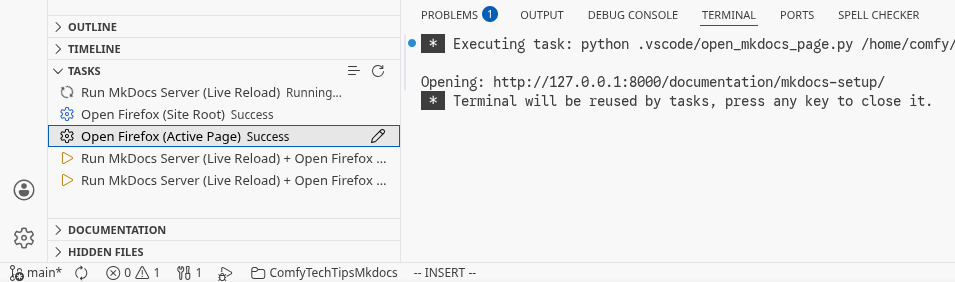
Here are my MkDocs Markdown snippets.
If you use a notes extension for capturing outside of repo, put this in your global snippets instead.
Markdown Snippets
{
    "Title (Doc)": {
        "scope": "markdown",
        "prefix": "Title (Doc)",
        "body": [
            "---",
            "title: ${1:$TM_FILENAME_BASE}",
            "description: ${2:Google Search / SEO}",
            "date:",
            "    created: $CURRENT_YEAR-$CURRENT_MONTH-$CURRENT_DATE",
            "    updated: $CURRENT_YEAR-$CURRENT_MONTH-$CURRENT_DATE",
            "---",
            "$0"
        ],
        "description": "mkdocs title"
    },
    "Title (Blog)": {
        "scope": "markdown",
        "prefix": "Title (Blog)",
        "body": [
            "---",
            "title: ${1:$TM_FILENAME_BASE}",
            "description: ${2:Google Search / SEO}",
            "author: ComfyTechTips",
            "date:",
            "    created: $CURRENT_YEAR-$CURRENT_MONTH-$CURRENT_DATE",
            "    updated: $CURRENT_YEAR-$CURRENT_MONTH-$CURRENT_DATE",
            "slug: $TM_FILENAME_BASE",
            "---",
            "",
            "${3:Top of document and hook}",
            "",
            "<!-- more -->",
            "",
            "${4:Hidden content}",
            "$0"
        ],
        "description": "mkdocs blog post with author and slug"
    },
    "Warning Box": {
        "scope": "markdown",
        "prefix": "Warning Box",
        "body": [
            "!!! warning",
            "    ${1:This will appear as a warning.}",
            "$0"
        ],
        "description": "mkdocs warning admonition"
    },
    "Note Box (Collapsed, Inline End, Custom)": {
        "scope": "markdown",
        "prefix": "Note Box (Collapsed)",
        "body": [
            "??? note inline end \"${1:My Warning}\"",
            "    ${2:Careful, this code can be very dangerous if ran without prior caution.}",
            "$0"
        ],
        "description": "mkdocs collapsible note inline end with custom title"
    },
    "Success Box (No Title)": {
        "scope": "markdown",
        "prefix": "Success Box (No Title)",
        "body": [
            "!!! success \"\"",
            "    ${1:RESULT}",
            "$0"
        ],
        "description": "mkdocs success box without title"
    },
    "Code Block (Highlight Lines)": {
        "scope": "markdown",
        "prefix": "Code Block (Highlight Lines)",
        "body": [
            "```${1:python} linenums=\"1\" hl_lines=\"${2:2 3}\"",
            "${3:def bubble_sort(items):",
            "    for i in range(len(items)):",
            "        for j in range(len(items) - 1 - i):}",
            "```",
            "$0"
        ],
        "description": "code block with line numbers and highlighted lines"
    },
    "Code Block (With Title)": {
        "scope": "markdown",
        "prefix": "Code Block (With Title)",
        "body": [
            "```${1:python} title=\"${2:bubble_sort.py}\"",
            "${3:def bubble_sort(items):",
            "    for i in range(len(items)):",
            "        for j in range(len(items) - 1 - i):",
            "            if items[j] > items[j + 1]:",
            "                items[j], items[j + 1] = items[j + 1], items[j]}",
            "```",
            "$0"
        ],
        "description": "code block with title"
    },
    "Multi-OS Tabs": {
        "scope": "markdown",
        "prefix": "Code Block Multi-OS",
        "body": [
            "=== \"${1:Windows}\"",
            "",
            "    ${2:Windows way:}",
            "",
            "    ```${3:powershell}",
            "    ${4:Write-Host \"Hello\"}",
            "    ```",
            "",
            "=== \"${5:Ubuntu Linux}\"",
            "",
            "    ${6:Another way to say hello world:}",
            "",
            "    ```${7:bash}",
            "    ${8:echo -e \"Hello\"}",
            "    ```",
            "$0"
        ],
        "description": "multi-OS tabbed content blocks"
    },
    "Multi-Language Tabs": {
        "scope": "markdown",
        "prefix": "Code Block Multi-Language",
        "body": [
            "=== \"${1:Python}\"",
            "",
            "    ${2:To say hello:}",
            "",
            "    ```${3:python}",
            "    ${4:print(\"Hello\")}",
            "    ```",
            "",
            "=== \"${5:C#}\"",
            "",
            "    ${6:Another way to say hello world:}",
            "",
            "    ```${7:csharp}",
            "    ${8:using System;",
            "",
            "    namespace HelloWorld",
            "    {",
            "        class Program",
            "        {",
            "            static void Main(string[] args)",
            "            {",
            "                Console.WriteLine(\"Hello, World!\");",
            "            }",
            "        }",
            "    }}",
            "    ```",
            "$0"
        ],
        "description": "multi-language tabbed code blocks"
    },
    "Table": {
        "scope": "markdown",
        "prefix": "Table",
        "body": [
            "| ${1:Product}      | ${2:What}                                 | ${3:Link} |",
            "| :----------- | :----------------------------------- | :--- |",
            "| ${4:`GET`}        | ${5::material-check:     Fetch resource}  | ${6:<>}   |",
            "| ${7:`PUT`}        | ${8::material-check-all: Update resource} | ${9:<>}   |",
            "| ${10:`DELETE`}     | ${11::material-close:     Delete resource} | ${12:<>}   |",
            "$0"
        ],
        "description": "markdown table with icons"
    },
    "Image (Centered with Caption)": {
        "scope": "markdown",
        "prefix": "Image (Centered)",
        "body": [
            "<figure>",
            "  <img src=\"${1:https://dummyimage.com/600x400/eee/aaa}\" width=\"${2:300}\" />",
            "  <figcaption>${3:Image caption}</figcaption>",
            "</figure>",
            "$0"
        ],
        "description": "centered image with caption"
    },
    "Nav Config (.nav.yml)": {
        "scope": "yaml",
        "prefix": "Nav Config Yaml",
        "body": [
            "title: ${1:Lorem Ipsum} # Custom title for .nav.yml root directory",
            "hide: ${2:false} # Hides .nav.yml root directory",
            "ignore: \"${3:*.hidden.md}\" # Hides pattern for files matching",
            "append_unmatched: ${4:true} # Anything that isn't explicitly caught will go to end",
            "",
            "sort:",
            "  direction: ${5:asc}",
            "  type: ${6:natural}",
            "  by: ${7:title} # some gotchas, read documentation",
            "  sections: ${8:last}",
            "  ignore_case: ${9:true}",
            "",
            "nav:",
            "  - ${10:one-i-want-first.md}",
            "  - \"*\" # the remaining files before directories and sections",
            "  - ${11:Custom Title: Directory}",
            "  - ${12:Custom Title: File.md}",
            "$0"
        ],
        "description": "mkdocs awesome-pages .nav.yml configuration"
    }
}
That is all!